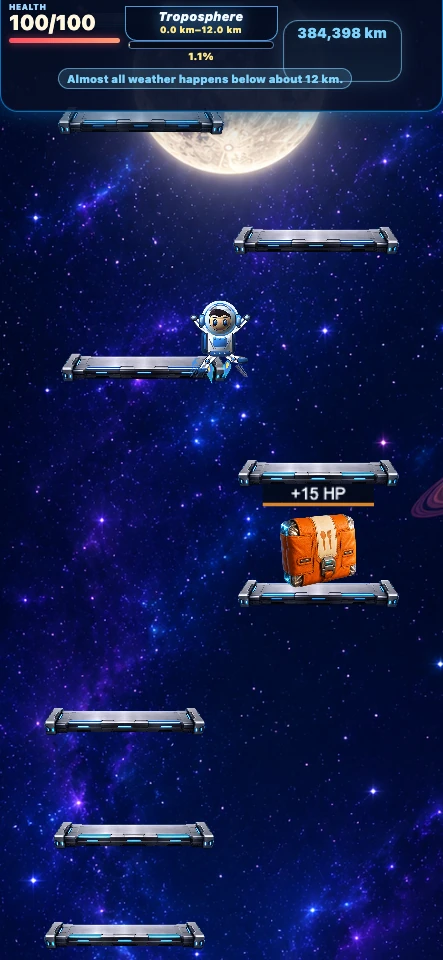
Game objective
Climb the compressed 384,400 km Moon route. Land to charge rocket energy and build precise chains. A full energy bar or 100 run-only stars launches a protected boost.
Controls
- On desktop, hold A or D or the left and right arrow keys to steer while airborne; mouse dragging also adjusts horizontal movement.
- On mobile, hold and drag left or right. Release or reverse direction early so momentum does not carry the astronaut beyond the safe part of a platform.
How scoring works
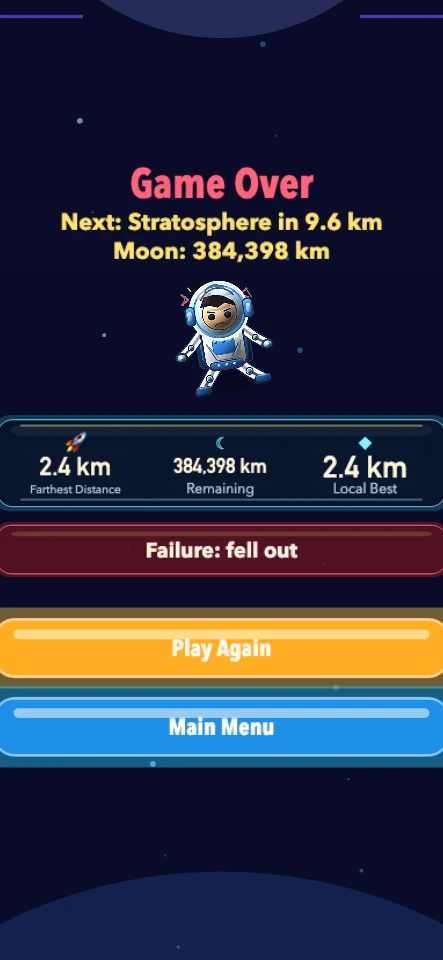
The only ranking value is the farthest distance reached in meters, submitted through the platform's compatible score field. Higher distance ranks first; equal 384,400 km Moon finishes remain tied and time, health, and pickups never break a tie.
Core mechanics
- New players start with independent 50% movement and 50% jump controls; saved settings are preserved.
- Landings charge 8% rocket energy; center landings add 3%. Precise chains of 3, 5 and 8 grant 5, 10 and 15 stars.
- Each route-star pickup grants 10 run-only stars and 5% energy. Stars reset after the run.
- A full energy bar or 100 stars launches through 100 platforms, advancing at least 500 km or four landings, capped at the Moon.
- Wide mint routes offer safer landings; narrow gold routes offer stars, energy or medical supplies. Branches rejoin without repeated rewards.
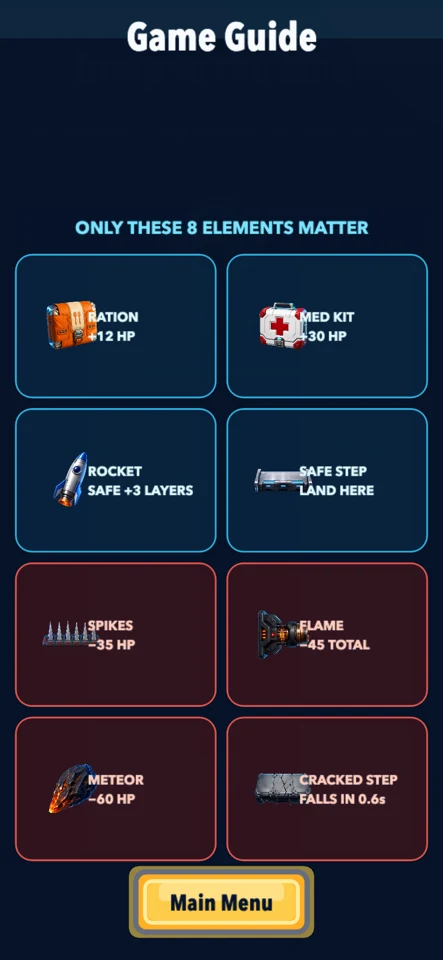
- Health starts at 100. Hazards consume health, supplies restore it, and falling entirely out of the playfield ends the run.
Common failure causes
- Holding a direction too long and drifting past the safe platform surface.
- Landing on spikes or remaining in a flame or meteor path until health reaches zero.
- Ignoring cracks on a collapsing platform or missing the playfield entirely, which ends the run without consuming health.
Game at a glance
- Session length
- Most attempts last 2–8 minutes; a fast expert Moon landing is calibrated near 3–4 minutes.
- Device support
- Desktop and mobile · portrait playfield
- Current version
- 1.1.2 · build 90e58d0ac48c
- Last gameplay test
- · Chromium desktop, Chromium mobile emulation
- Input methods
- Keyboard, Mouse drag, Touch drag
Release history
- Version 1.1.2 —
Web build aligned with the WeChat developer source: flight routes, landing rewards, 100-platform rockets and independent 50% defaults. Developer upload does not imply WeChat review approval or live publication.
- Version 2.0.11 —
Raised the run-only rocket exchange to 100 stars, balanced star and medical-kit placement, rebuilt the rocket as a locked vertical 500 km platform-smashing surge, and added warned autonomous collapses only where a safe alternate route exists.
- Version 2.0.10 —
Guarded the distance and rocket HUD during the first runtime frame so the game can initialize cleanly before live run data is available.
- Version 2.0.9 —
Rebuilt the mission menu around an upright neutral astronaut, a single clear start action, visible steering sensitivity, and concise Best, 50-star rocket, and free 100 km rocket rules; the visual guide now explains controls and random run-only stars.
- Version 2.0.8 —
Rebalanced the result screen into adaptive content and action regions, shortened the leaderboard to its actual entries, added safe text insets, and compacted the fullscreen control so it cannot cover result copy.
- Version 2.0.7 —
Changed run-only stars from platform-wide clusters to seeded random placement on only some routes, and restored visible, touch-tested Play Again and Main Menu actions across phone and desktop result screens.
- Version 2.0.6 —
Fixed a premature-completion bug by making the accumulated 384,400 km distance authoritative. Pre-generated or stale landing-pad markers can no longer end a run early.
- Version 2.0.5 —
Added visible stars to safe routes. Stars last for the current run only, and 50 stars can be exchanged for an extra 500 km rocket surge without replacing the free 100 km charge.
- Version 2.0.4 —
Removed the decorative circle behind the menu astronaut and kept the full-screen control available outside active runs while hiding it during play.
- Version 2.0.3 —
Added mobile full-screen play with an iPhone immersive fallback, and replaced random rocket pickups with a reusable 100 km charge button that launches a vertical, platform-smashing 500 km surge.
- Version 2.0.2 —
Replaced viewport-dependent pixel distance with landing-based progress and recalibrated health, healing, and survival pressure.
- Version 2.0.1 —
Replaced ambiguous legacy props with eight illustrated survival elements, direct effect labels, a visual guide, and the restored premium Moon backdrop.
- Version 2.0.0 —
Rebuilt the game around health, warned hazards, safe supplies, stage-scaled rockets, real-meter Moon progress, and distance-only daily ranking.
Tips for Jump to the Moon
- Correct your direction before the jump apex and aim for platform centers.
- Choose wide mint routes for recovery; take reward routes when safe.
- Watch the top HUD for health, stars, distance and Moon progress.
- Charge energy through landings and collect stars for a boost or revival.
- Use the separate fullscreen toolbar for a larger view, then retry from the game’s result screen.
Frequently asked questions
What changed in 1.1.2?
This separate browser build uses the October 8 WeChat developer source: independent movement and jump settings, flight-route rewards, rocket boosts and short-screen clearance. WeChat is not required.
How do stars and rockets work?
Each route-star pickup grants 10 run-only stars and 5% energy. Stars reset after the run. A full energy bar or 100 stars launches through 100 platforms, advancing at least 500 km or four landings, capped at the Moon.
Which inputs are supported?
Keyboard, mouse drag and touch drag. Fullscreen uses a separate toolbar outside gameplay.
What ends a run?
Health reaching zero, falling out of the playfield or reaching the Moon. Use the game’s result controls to retry.
Are saved settings reset?
No. Existing settings are preserved; new players start with 50% movement and 50% jump.
Guides and collections
Developer and rights
- Owner, publisher, and operator
- Taopu Kuailema Trading Firm (Individual Industrial)
- Chinese legal name
- 天津市静海区桃浦快乐马商贸行(个体工商户)
- Registered operator
- HE TIANXIONG
- Brands
- Hersch Games / GameHersch
Jump to the Moon is owned, published, and operated by Taopu Kuailema Trading Firm (Individual Industrial) under the Hersch Games / GameHersch brands.
Related games
Updated